
First Driver Developpment
Introduction
To truly control a Windows system, you must operate at Ring 0, i.e., the kernel. The problem is that from user mode (Ring 3), you cannot interact directly with Ring 0, so it is impossible to modify the kernel’s internal structures, disable an EDR’s monitoring mechanisms, or manipulate process protections. Tools like WinDbg allow you to explore and modify kernel memory, but they are not viable in production environments: WinDbg requires a reboot to enable debug mode, a second machine connected as a debugger, and freezes the entire system with every intervention. The alternative is to write code that runs directly in Ring 0: a kernel driver
This article covers the fundamentals of Windows driver development: their internal architecture, the communication mechanism between a user-mode client and a kernel driver, and practical implementation through writing, compiling, and loading a first functional driver.
Why a Driver?
A user-mode process cannot directly access kernel memory, modify structures such as _EPROCESS, or interact with the hardware. The boundary between Ring 3 and Ring 0 cannot be crossed without going through a syscall, and the available syscalls do not allow actions such as deleting a kernel EDR callback or replacing a process’s token.
A driver is code compiled into a .sys file that loads into the kernel and runs in Ring 0. It has access to the entire kernel memory and the system’s internal structures, and can do everything the kernel can do. In an offensive context, a malicious driver (also known as a rootkit) automates the manipulations typically performed with WinDbg: modifying tokens, hiding processes, removing callbacks, or disabling protections.
Driver Architecture
DriverEntry - The Entry Point
Every driver has a mandatory entry point called DriverEntry. It is the equivalent of main() in a user-mode program: when the system loads the driver into memory, DriverEntry is the first thing to execute.
1 | NTSTATUS DriverEntry(PDRIVER_OBJECT DriverObject, PUNICODE_STRING RegistryPath) |
Two parameters are passed by the kernel:
- DriverObject: This is the kernel structure that represents the driver. It is to the driver what
_EPROCESSis to the process; it contains essential information such as registered handles, the associated device object, and the unload function. It is through this structure that the driver’s behavior is configured. - RegistryPath: This is a pointer to the path of the driver’s registry key in
HKLM\SYSTEM\CurrentControlSet\Services\<DriverName>. Windows stores the configuration of each service and driver in the registry. In practice, most rootkits do not use this parameter.
Device Object and Symbolic Link
For a user-mode client to communicate with the driver, DriverEntry must create two things:
The Device object: is a contact point in the kernel; it is the object that receives I/O requests from clients. It is created via IoCreateDevice and resides in the kernel namespace under \Device\MonDriver. A user-mode process cannot directly access this namespace.
The Symbolic Link is an alias in the user-mode namespace created via IoCreateSymbolicLink. It points to the device object and allows the client to access it via the path \\.\MyDriver; Windows resolves the symbolic link to the device object, and communication is established.
Without the device object, there is nothing to contact. Without the symbolic link, the user-mode client cannot find the device object. The two are inseparable.

MajorFunction — The Handler Array
The DriverObject contains a MajorFunction field: an array of 28 slots, each corresponding to an I/O request type defined by Windows. When a user-mode client calls a function such as CreateFile, the kernel identifies the request type, retrieves the function stored at the corresponding index in the array, and calls it automatically. If no function is registered at an index, the kernel uses a default handler that does nothing.
In practice, a rootkit fills only 3 of the 28 slots.
Index 0 - IRP_MJ_CREATE: triggered when the client calls CreateFile to open a handle to the driver
Index 2 - IRP_MJ_CLOSE: Triggered when the client calls
CloseHandleto close this handle.
These two handlers are minimalistic; they accept a request and return a success status.Index 14 - IRP_MJ_DEVICE_CONTROL: triggered when the client calls
DeviceIoControl; this is the critical handler. It is within this single function that the driver’s logic resides. The client passes anIOCTL codethat specifies the identifier of the action it is requesting. The handler performs aswitchon this code and executes the corresponding block. There is no limit on the number of IOCTL codes: a driver can expose as many commands as necessary.
1 | DriverObject->MajorFunction[IRP_MJ_CREATE] = CreateHandler; |
The MajorFunction array is therefore merely the routing mechanism: it links the type of request to the function to be called. The driver’s true flexibility lies within the DeviceIoControl handler, in the IOCTL codes.
Unload Function
When the driver is unloaded, the kernel calls the Unload function registered in DriverObject->DriverUnload. This function cleans up: it removes the symbolic link using IoDeleteSymbolicLink and deletes the device object using IoDeleteDevice. If these objects are not cleaned up, they remain orphaned in the kernel, which can cause problems if you want to reload the driver.

Client-Driver Communication
Client Side
The client-side sequence is always the same, consisting of three steps:
CreateFile("\\.\MyDriver"): Opens a handle to the driver via the symbolic link. A handle is a numerical identifier that the kernel returns to allow the client to interact indirectly with the device object. It is added to the handle table of the calling process.DeviceIoControl(hDevice, IOCTL_CODE, &inputData, ...): Sends a command to the driver. Two pieces of information are transmitted: an IOCTL code that identifies the action the client is requesting (read memory, kill a process, etc.), and a data buffer containing the parameters for the action (a PID, a memory address, etc.)CloseHandle(hDevice): Closes the handle and frees the resources
The IRP - I/O Request Packet
When the client calls DeviceIoControl, the kernel does not pass the arguments directly to the driver’s handler. It creates an intermediate structure called IRP (I/O Request Packet) that encapsulates all the request information. It is this IRP that the kernel passes to the handler.
The IRP is a generic structure; it is used for all types of I/O operations (CreateFile, ReadFile, WriteFile, DeviceIoControl). Rather than maintaining a different mechanism for each type of operation, the kernel uses a single routing system based on IRPs.
The information is distributed within the IRP as follows:
- Client data (a buffer containing the PID, address, etc.) is in
Irp->AssociatedIrp.SystemBuffer. The kernel copies the user-mode buffer into this kernel-safe area: this is “Buffered I/O” mode - The IOCTL code is not directly in the main IRP. It is in a substructure called O_STACK_LOCATION, accessible via
IoGetCurrentIrpStackLocation(Irp). Information specific to each type of operation is in the stack location, not in the IRP itself.
Driver Side - The Handler
The DeviceControlHandler receives the IRP and extracts what it needs from it:
1 | NTSTATUS DeviceControlHandler(PDEVICE_OBJECT DeviceObject, PIRP Irp) |
The IOCTL code is simply a numeric identifier defined by the driver developer. Each value corresponds to a different action. The handler performs a switch on it to execute the correct block of code. This is exactly what we reverse-engineer in a vulnerable driver: identifying the exposed IOCTL codes and understanding what each case does.
Complete Flow
Let’s recap the end-to-end flow:
DriverEntryexecutes when the driver loads. It creates the device object, the symbolic link, and registers the handlers inMajorFunction.- The client calls
CreateFile("\\.\MyDriver")to open a handle to the driver. - The client calls
DeviceIoControl(hDevice, IOCTL_CODE, &data, ...)to send a command - The call crosses the Ring 3/Ring 0 boundary via a syscall
- The kernel creates an IRP containing the client data (
SystemBuffer) and the IOCTL code (IO_STACK_LOCATION). - The kernel consults
DriverObject->MajorFunction[14]to find the registered handler. - The handler executes, extracts the IOCTL code and data from the IRP, performs a
switchon the IOCTL code, and executes the corresponding action.

Loading and Unloading a Driver
Prerequisites
Windows refuses to load a driver that is not digitally signed due to Driver Signature Enforcement (DSE), which has been enabled since Windows Vista. To load an unsigned driver in a test environment, two prerequisites are required:
- Secure Boot must be disabled in the BIOS
- TestSigning mode must be enabled via
bcdedit /set testsigning on, followed by a reboot. This mode allows Windows to accept drivers signed with test certificates.
In red team operations, we obviously cannot ask the target to enable test signing. Techniques such as BYOVD, DSE disabling via a vulnerable driver, the use of stolen certificates, or downgrade attacks allow these restrictions to be bypassed.
sc.exe Commands
Windows treats drivers as services. The sc.exe tool allows them to be managed from the command line with administrator privileges:
1 | sc create MonDriver type= kernel binPath= C:\chemin\MonDriver.sys |
The first command registers the driver as a kernel-mode service. The second loads it into memory; this is when DriverEntry executes.
To unload:
1 | sc stop MonDriver |
sc stop triggers the driver’s Unload function, then sc delete removes the service entry from the registry.

Hands-On Practice - First Driver
Setup
Driver development requires:
- Visual Studio 2022 with the “Desktop development with C++” workload and Spectre-mitigated libraries (MSVC v143 x64/x86)
- Windows SDK (version 10.0.26100.0 or later)
- Windows Driver Kit (WDK) with the same build number as the SDK
Once installed, the “Empty WDM Driver” template is available in Visual Studio to create a new driver project.
Code
The minimal driver below displays a message upon loading and unloading, allowing you to verify that the compilation → loading → execution chain works:
1 |
|
UNREFERENCED_PARAMETER is a macro that suppresses compiler warnings for parameters not used in the function body. In kernel mode, warnings are treated as errors, so this macro prevents the compilation from failing.
DbgPrintEx displays a debug message visible from WinDbg or DebugView. The parameters DPFLTR_IHVDRIVER_ID and DPFLTR_INFO_LEVEL specify the category and level of the message.
Compilation and Testing
After compiling in Release x64 configuration, the .sys file is generated in the project’s output folder.

To test it:
- Copy the
.sysfile to the target Windows VM. - Ensure that Secure Boot is disabled and that test signing is enabled.
- Connect WinDbg in kernel debugging mode (kdnet) to view the messages.
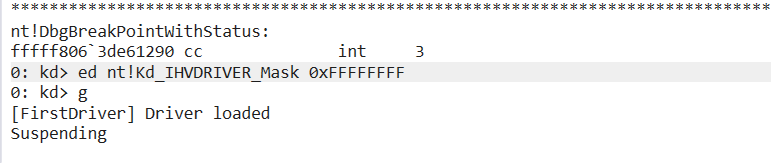
- Enable the debug filter for the IHVDRIVER category:
1 | ed nt!Kd_IHVDRIVER_Mask 0xFFFFFFFF |
- Load the driver:
1 | sc create FirstDriver type= kernel binPath= C:\chemin\Drivertest.sys |
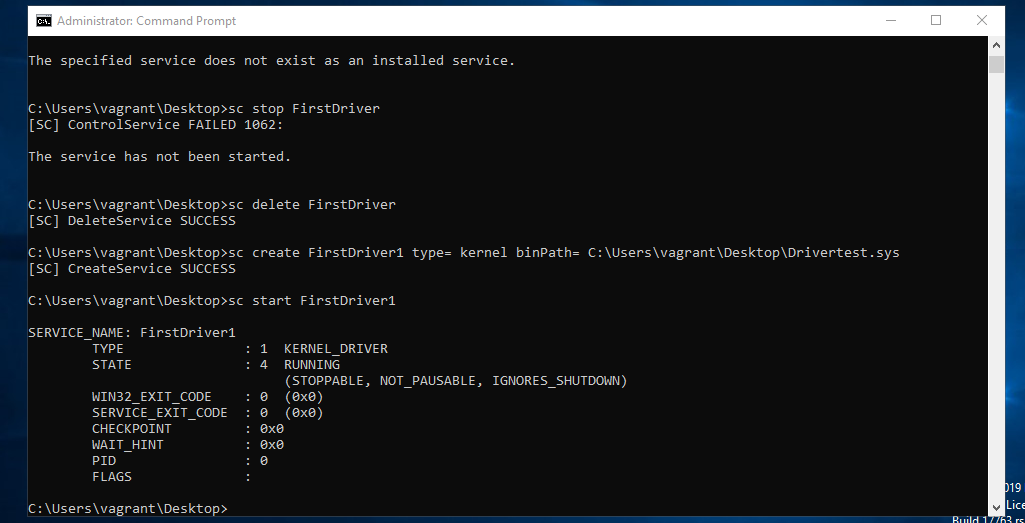
The message “[FirstDriver] Driver loaded” appears in WinDbg, confirming that the driver is running in Ring 0.
Conclusion
This first driver is intentionally minimal; it creates neither a device object nor a symbolic link, and merely logs its loading and unloading. The goal was to understand the fundamental architecture: DriverEntry, the DriverObject, the MajorFunction array, IRPs, IOCTL codes, and the complete communication chain between a user-mode client and a kernel driver.
These concepts form the basis of any Ring 0 offensive operation. Whether reverse-engineering a vulnerable driver to find exploitable IOCTLs, writing a rootkit that removes EDR kernel callbacks, or exploiting a BYOVD to access the kernel, everything relies on this client-driver communication mechanism.